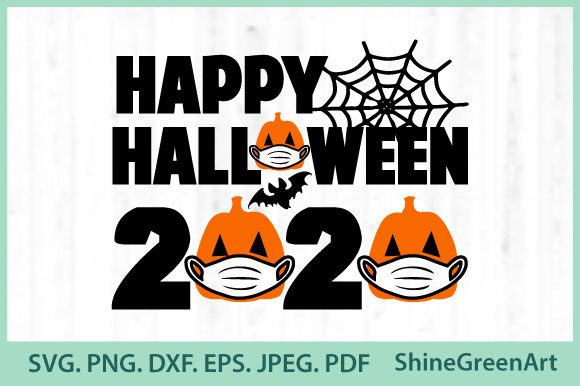
Halloween – Happy Halloween Mask Pumpkin
When you’re planning a Halloween project, the last thing you want is to scramble for last‑minute designs that look blurry, pixelated, or just plain awkward. That’s exactly where Halloween – Happy Halloween Mask Pumpkin steps in. It’s a clean, high‑resolution vector bundle that gives you a festive pumpkin mask illustration—complete with a cheerful “Happy Halloween” message—in multiple file formats. Whether you’re a hobbyist crafter, a small business owner, a teacher, or a digital creator, this set is designed to save you time and deliver professional results without the headache of reformatting or resizing.
Let’s walk through where, when, and why you’d actually use this design, plus what you should keep in mind before downloading or applying it.
What’s in the bundle and why it matters
The package includes one SVG file, one transparent PNG at 300 dpi, an EPS, a DXF, a JPEG, and a PDF. All files are vector‑based and come at 300 dpi, meaning they’re crisp at printing size and can be scaled up or down without losing quality. For someone who juggles multiple projects across different mediums, that range of formats is a real time‑saver. You don’t have to convert anything—you just pick the file that works for your tool or platform and get going.
The core design features a classic jack‑o‑lantern style pumpkin with a cheerful “Happy Halloween” text arranged around it. It carries that nostalgic, slightly whimsy nod to Halloween traditions while staying clean enough for modern uses. Think of it as a flexible starting point for anything you’d normally carve, cut, print, or display.
Home decorating with a personal touch
You’re hosting a small Halloween gathering. Instead of buying generic store signs, you decide to create your own decorations. You download the PNG, print it on quality cardstock, and frame it for a hallway table. Or you use the SVG with a vinyl cutter to make removable wall decals for the front door. The transparent background on the PNG also means you can layer it onto a colored backing or an existing poster board without ugly white edges. For families who want an easy, kid‑friendly DIY, the PDF works as a simple coloring page or a stencil for painting on a canvas tote bag.
Crafting and handmade goods for small businesses
If you sell on Etsy, at local craft fairs, or through a personal online shop, having a design like this in multiple formats is a small advantage that adds up. You can use the SVG to create custom iron‑on transfers for T‑shirts or tote bags. The DXF works perfectly with a Cricut or Silhouette machine for cutting chipboard or adhesive vinyl for mugs, notebooks, or wooden signs. The high‑resolution EPS ensures that if you’re working with screen printing or large‑format printing for banner displays, the artwork will hold its line quality even at poster size. A customer might order a set of pumpkin‑themed coasters or a wall hanging—this design gives you a ready‑to‑use element that’s on‑trend and easy to customize further.
Digital content and social media visuals
Bloggers, marketers, and social media managers often need quick Halloween visuals that don’t look like stock photo leftovers. The transparent PNG is perfect for inserting into Instagram posts, Facebook event covers, or Pinterest pins. You can layer the pumpkin onto a dark background, add your own text overlay for a giveaway or promotion, and you’re set. Because it’s vector, you can edit the SVG in software like Inkscape or Illustrator to change colors, remove the text, or isolate just the pumpkin if you need a standalone icon. No need to re‑draw anything from scratch.
Educational activities in classrooms or daycares
Teachers and educators can use the JPEG or PDF for simple print‑and‑go worksheets, bulletin board decorations, or craft templates. You might have students cut out the pumpkin shape, then write their own “Happy Halloween” message inside. The 300 dpi resolution ensures that when you print a class set, the lines stay sharp, not fuzzy. For virtual classrooms, the PNG can be dropped into a slide deck or a digital assignment as a visual prompt. It’s a no‑fuss resource that fits nicely into a seasoned teacher’s resource binder.
Event signage and promotional materials
If you’re organizing a Halloween party at a community center, school, or even an office, you need signs that communicate clearly and look deliberate. Use the EPS or PDF to print a standard 8.5x11 flyer or scale up to 24x36 for a welcome banner. The vector nature means you can adjust the size without having to worry about resolution. Add your venue details around the design, and you’ve got a cohesive look without hiring a designer. For a fundraiser, you might use the DXF to cut a wooden sign that gets painted and placed at the entrance.
What to consider before you download and use it
Before jumping in, think about the software and tools you already use. If you’re working with a Cricut, Silhouette, or Brother ScanNCut, the DXF format is usually your safest bet, but double‑check that your machine’s software supports SVG as well—some newer models do. The EPS is great for professional design applications like Adobe Illustrator or CorelDRAW, while the PDF is the most universal for straight printing. The PNG with transparency is ideal for web use because you don’t have to erase a white background.
Also consider the design’s layout. It includes both the pumpkin illustration and the “Happy Halloween” text as one cohesive unit. If you only need the pumpkin without the text, you’ll need vector editing software to separate the elements. That’s straightforward in an SVG editor, but if you’re solely using a cutting machine’s basic software, you might have to work with the whole grouped design. That’s not a problem for most projects, but it’s good to know beforehand.
Check your intended use’s color requirements. The design is delivered as a single color vector (likely black), which means you can easily recolor it in your software. For a monochrome print or a cut, that’s perfect. For a full‑color sign, you’d add your own fill or use the PNG which may come with color details—check the file preview to see if the bundle includes a colored version or just a line art style. If you need a multi‑color piece, the vector formats give you full flexibility to paint or fill segments.
Lastly, think about size. Because these are vector files, they can be scaled from a tiny 1‑inch sticker all the way up to a 4‑foot banner without pixelation. But if you’re printing at very large sizes, consider the file format you choose. The EPS and SVG will scale infinitely. The PNG, while 300 dpi, will start to lose sharpness if you scale it way up—so for large prints, stick to the vector versions.
Why this bundle works for different kinds of users
For a busy mom putting together Halloween treat bags, the JPEG is quick to print and cut. For a freelancer designing a newsletter header, the transparent PNG sits right into the layout without extra fuss. For a small biz owner who cuts vinyl weekly, the DXF and SVG are what they already open on their machine. For a teacher, the PDF is a ready‑to‑go handout. And for a graphic designer or publisher, the EPS is the standard they expect. That breadth of usability means you aren’t locked into one workflow—you can grab what fits your current task and move on.
There’s also the convenience factor of having everything in one zipped folder. No hunting around for different file types or converting formats that lose quality. The 300 dpi baseline ensures that whether you’re printing a single test sheet or a full run, the output matches what you see on screen. For anyone who’s had a print come out jagged because the resolution was too low, that’s a welcome detail.
Practical tips for getting the most out of this design
If you plan to use this for commercial products (like selling shirts or mugs), make sure the license allows it. Most design bundles like this one are royalty‑free for both personal and small commercial use, but it’s worth a quick check. You don’t want any surprises later.
For cutting machines, always run a test cut on a small scrap piece of material before committing to a full sheet. The thin lines in the pumpkin details might need slight adjustments in pressure or blade depth depending on your material. The design is clean, so you should get good results quickly.
If you’re using the PNG for digital projects, it’s already optimized for screen. But if you need to place it on a dark background and the edges look faint, sometimes a one‑pixel white border can appear. In that case, open the PNG in a photo editor and expand the selection by 1 pixel to remove any fringe.
Finally, consider combining this design with other Halloween elements you already own. A simple pumpkin mask with a “Happy Halloween” message pairs well with bats, spider webs, or a “Boo” typography. The vector format makes it easy to layer and adjust seamlessly.
Real outcomes from a straightforward design
At the end of the day, Halloween – Happy Halloween Mask Pumpkin isn’t about flashy effects or complicated artwork—it’s about having a reliable, versatile visual that works across the many ways people celebrate and promote Halloween. One person might print it on a card and gift it to a neighbor. Another might turn it into a best‑selling mug in their Etsy shop. A third might use it as a quick slide background for a virtual event. The common thread is that the design does what it promises: it looks good, scales easily, and comes in formats that match how you actually work.
Whether you’re prepping for this year’s celebration, stockpiling ideas for next season, or just want a clean pumpkin‑themed asset in your creative library, this bundle removes the friction of formatting and lets you focus on the fun part—making something memorable. No frustrating conversions, no pixelated prints, just a honest vector illustration ready to be used.