Back to School Element Illustration: A Practical Evaluation for Designers and Educators
Creating visual content for educational materials, presentations, or marketing campaigns often requires a consistent set of icons and illustrations. The Back to School Element Illustration pack offers a collection of flat-style vector and raster assets designed to meet this need. This article provides a balanced evaluation of this resource, helping you decide if it aligns with your project requirements, workflow, and budget.
What Is the Back to School Element Illustration Pack?
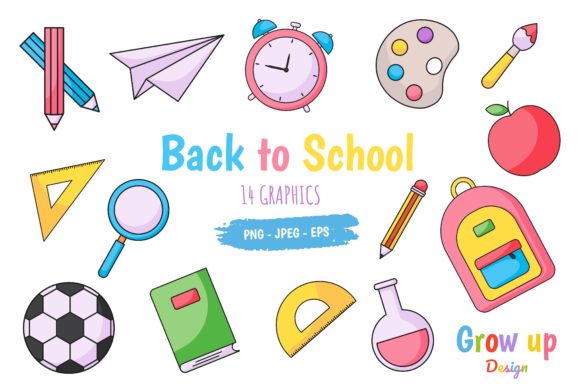
This asset pack is a curated set of flat vector and raster graphics centered on school and education themes. It includes icons and decorative elements such as books, pencils, school buses, graduation caps, apples, and classroom objects, all rendered in a consistent flat illustration style. The pack delivers five different file formats for each design: AI, EPS, JPEG, PNG, and SVG. Every file is provided at a resolution of 1980 x 1200 pixels, making it suitable for both digital and print use. The AI and EPS vectors allow for full editing, while PNG and JPEG offer ready-to-use raster versions. SVG files provide scalable web-friendly graphics.
Because the designs are flat icons and elements rather than detailed scenes, they function best as accent graphics, supporting visuals, or building blocks within a larger layout. The pack is intended for users who need a quick, cohesive visual language without designing every element from scratch.
Who Might Be Interested in This Resource?
The pack appeals to several groups, each with distinct goals:
- Educators and school administrators creating newsletters, flyers, parent handouts, or classroom decorations.
- Instructional designers and e-learning developers building course materials, slide decks, or digital learning modules.
- Graphic designers and marketing professionals working on back-to-school campaigns, educational product packaging, or institutional branding.
- Small business owners and freelancers producing social media posts, website graphics, or promotional materials for educational services.
- Hobbyists and content creators making printables, blog graphics, or personal projects with an academic theme.
Each of these users has different priorities—some value editing flexibility, others need immediate deployment, and many want a consistent style across multiple outputs. Understanding where the pack fits within these needs is key to evaluating its usefulness.
Understanding the Five Formats and What They Offer
The inclusion of five formats is a practical advantage, but each format serves a specific purpose. Knowing when to use each can save time and reduce frustration.
AI and EPS are vector formats native to Adobe Illustrator and many other vector editors. These files give you full control over every anchor point, color, and stroke. If you need to resize an element without losing quality, change colors to match a brand palette, or combine elements into a custom composition, these formats are essential. They are the most flexible but require vector editing software and some familiarity with the tools.
SVG is a web-standard vector format that can be scaled infinitely in browsers and modern applications. It is ideal for use in websites, learning management systems, or any digital interface where crisp rendering at multiple sizes is needed. SVGs can also be styled and animated with CSS, which adds potential for interactive projects.
PNG provides raster images with transparent backgrounds, ready for drag-and-drop use in presentations, documents, or image editors. They are convenient when you need a quick graphic without opening a vector application. However, resizing PNG upward can lead to pixelation, so they work best at or near the provided resolution.
JPEG offers compressed raster images with solid backgrounds. They are suitable for web use, email attachments, or print layouts where a white or colored background is acceptable. JPEGs are smaller in file size than PNGs, but the lossy compression can reduce quality if repeatedly edited or saved.
Having all five formats means you can choose the right tool for each task without converting files yourself, which can introduce errors or style inconsistencies.
Benefits of Using Pre-Made Illustration Elements
Adopting a pre-made pack like this one offers several practical advantages over creating original illustrations from scratch:
- Time savings: A set of ready-to-use graphics can reduce project turnaround time significantly, especially when multiple visual assets are needed quickly.
- Consistent visual style: All elements share the same flat aesthetic, line weights, color palette, and level of detail. This coherence is often difficult to maintain when sourcing graphics from multiple free collections.
- Flexibility through vectors: Because AI, EPS, and SVG files are fully editable, you can customize colors, combine elements, resize without limits, and adapt the graphics to fit your brand or layout requirements.
- Multi-purpose resolution: The 1980 x 1200 pixel dimensions are large enough for full-screen presentations, social media headers, flyers, and many print projects up to about A5 size at 300 DPI.
- No attribution requirements: Purchased asset packs typically come with a license that does not require crediting the creator, simplifying your workflow and client deliverables.
These benefits make the pack a practical option for projects where speed, consistency, and ease of use are priorities.
Tradeoffs and Considerations to Weigh
No single asset pack can meet every need, and being aware of limitations helps you make an informed decision.
Style specificity: The flat icon style is popular and versatile, but it may not suit every brand or project. If your visual identity uses detailed realism, 3D graphics, hand-drawn sketches, or a minimalist line-only approach, this pack may feel visually mismatched. Consider whether the flat aesthetic aligns with your overall design language before purchasing.
Limited thematic scope: The pack focuses specifically on back-to-school and education themes. While this is its strength, it also means the elements may not be suitable for other topics like technology, healthcare, or finance. If your project requires a broader set of icons, you may need to combine this pack with other resources, which can introduce style inconsistencies.
Customization learning curve: While the vector formats offer editing freedom, using them requires software like Adobe Illustrator, Affinity Designer, or Inkscape. Users without access to or familiarity with these tools will be limited to the PNG and JPEG versions. Always check your software compatibility before committing.
Resolution constraints: Although 1980 x 1200 pixels is generous for many uses, it may be insufficient for large-format print projects like posters, banners, or billboards without upscaling, which can degrade quality. For large print outputs, the vector formats are necessary to scale without limits, but the complexity of the individual elements may not be high enough to fill large spaces effectively.
License restrictions: Asset packs often have license terms that limit use—for example, prohibiting resale of the raw files, restricting use in certain types of commercial products, or limiting the number of users. Review the license included with your purchase to ensure it matches your intended use cases.
Situations Where This Pack Is a Strong Fit
Based on its features and limitations, the Back to School Element Illustration pack works well in these scenarios:
- Time-sensitive projects: When you need school-themed graphics within hours or days, the ready-to-use files eliminate the design phase entirely.
- Presentation slides: Flat icons work well in PowerPoint, Google Slides, or Keynote, adding visual interest without distracting from content. The PNG and SVG formats integrate easily with these tools.
- Educational handouts and worksheets: Printed materials for students benefit from simple, clear visuals that reinforce concepts without overwhelming the layout.
- Social media posts: The square-friendly aspect ratio and flat style are well-suited for Instagram, Facebook, LinkedIn, and Pinterest graphics promoting academic content or enrollment campaigns.
- Website icons: SVGs can be used for navigation icons, feature lists, or decorative section dividers on educational websites or e-learning platforms.
- Newsletters and emails: Small icons placed next to headlines or calls to action can improve readability and engagement in email marketing.
In these contexts, the pack serves as a practical timesaver that delivers professional-looking visuals with minimal effort.
When Alternatives May Be Worth Considering
There are situations where a different approach might serve you better:
- You need a unique brand identity: Pre-made packs are shared by many buyers. If your school or educational brand requires exclusive graphics to stand out, commissioning a custom illustration set or using an icon system that you heavily modify may be a better investment.
- You require comprehensive icon sets: If your project needs hundreds of icons covering diverse categories (e.g., science, math, language arts, sports, technology), this pack may be too narrow. Consider a larger icon library or a subscription service that offers broader coverage.
- You are working on large-format prints: For posters, banners, or wall graphics, you may need higher resolution raster files or more detailed vector artwork that can scale dramatically. This pack is best suited to small and medium formats.
- You prefer open-source or free resources: Many free icon sets exist online with similar flat styles, though they may lack the consistency, format variety, or licensing clarity of a paid pack. If your budget is very limited, free options may be worth exploring, but check their licenses carefully.
- You need animated or interactive graphics: The static nature of these illustrations means they will not cover motion graphics or interactive elements without additional work. If your project requires animated icons or interactive web components, you might need to source specialized assets or build them yourself.
Evaluating these alternatives honestly will help you decide whether the pack is the right fit or whether another approach aligns better with your goals, skills, and timeline.
Practical Insights for Making Your Decision
To determine if the Back to School Element Illustration pack meets your needs, consider these practical steps:
- Review the sample images provided in the product listing. Look at the level of detail, the color palette, and the variety of elements. Ask yourself whether these graphics would look natural in your intended layouts.
- Check your software capabilities. If you plan to edit the vectors, ensure you have access to a program that opens AI, EPS, or SVG files. If not, confirm that the PNG and JPEG versions will suffice for your use cases.
- List your specific use cases. Write down the types of projects you need graphics for—presentations, social media, print, web—and estimate how many unique elements you will use. This will help you judge whether the pack's variety is sufficient.
- Compare with your budget. Determine how much you are willing to spend on graphic assets for this project. Factor in the time savings versus the cost of creating your own or sourcing free alternatives.
- Read the license terms carefully. Ensure the pack can be used in the ways you intend, especially if you are creating products for resale, using it in client work, or sharing across a team.
- Consider a test download. Some sellers offer preview files or smaller packs. If available, download a sample to test the quality, format compatibility, and ease of editing before committing to the full set.
Taking these steps reduces the risk of purchasing an asset that does not meet your expectations and helps you use the pack more effectively if you decide it is a good match.
Final Perspective on the Back to School Element Illustration Pack
The Back to School Element Illustration pack offers a practical, time-efficient solution for anyone needing flat-style educational graphics across multiple formats. Its strongest appeal lies in the combination of editable vectors and ready-to-use raster files, all sized at a generous 1980 x 1200 pixels. For educators, designers, and marketers working on school-themed projects, it can eliminate the need to design icons from scratch while providing a consistent visual style.
However, the pack is not a universal solution. Its flat aesthetic and narrow thematic focus mean it works best in contexts where those qualities are an advantage rather than a limitation. Users who need a unique brand identity, a broader icon set, or large-format capabilities may find better value elsewhere.
Ultimately, the decision comes down to matching the pack’s strengths to your specific project requirements. By evaluating your needs against the features, tradeoffs, and alternatives discussed here, you can make a confident choice that serves both your creative goals and your practical constraints.